Trading item for item
In Item / Item mode you swap one item straight for another, for example iron for diamonds. You don't need any money for it. The market sells the item you have and buys the item you want in one step. This page shows you how.
Before you start
- Both items need a market on your server.
- The item you pay with must be in your bank account, like for any trade. The item you get lands in the same account.
- You know the basics of market and limit orders.
Choosing the pair
- Open the trading screen at a Stock Market Block.
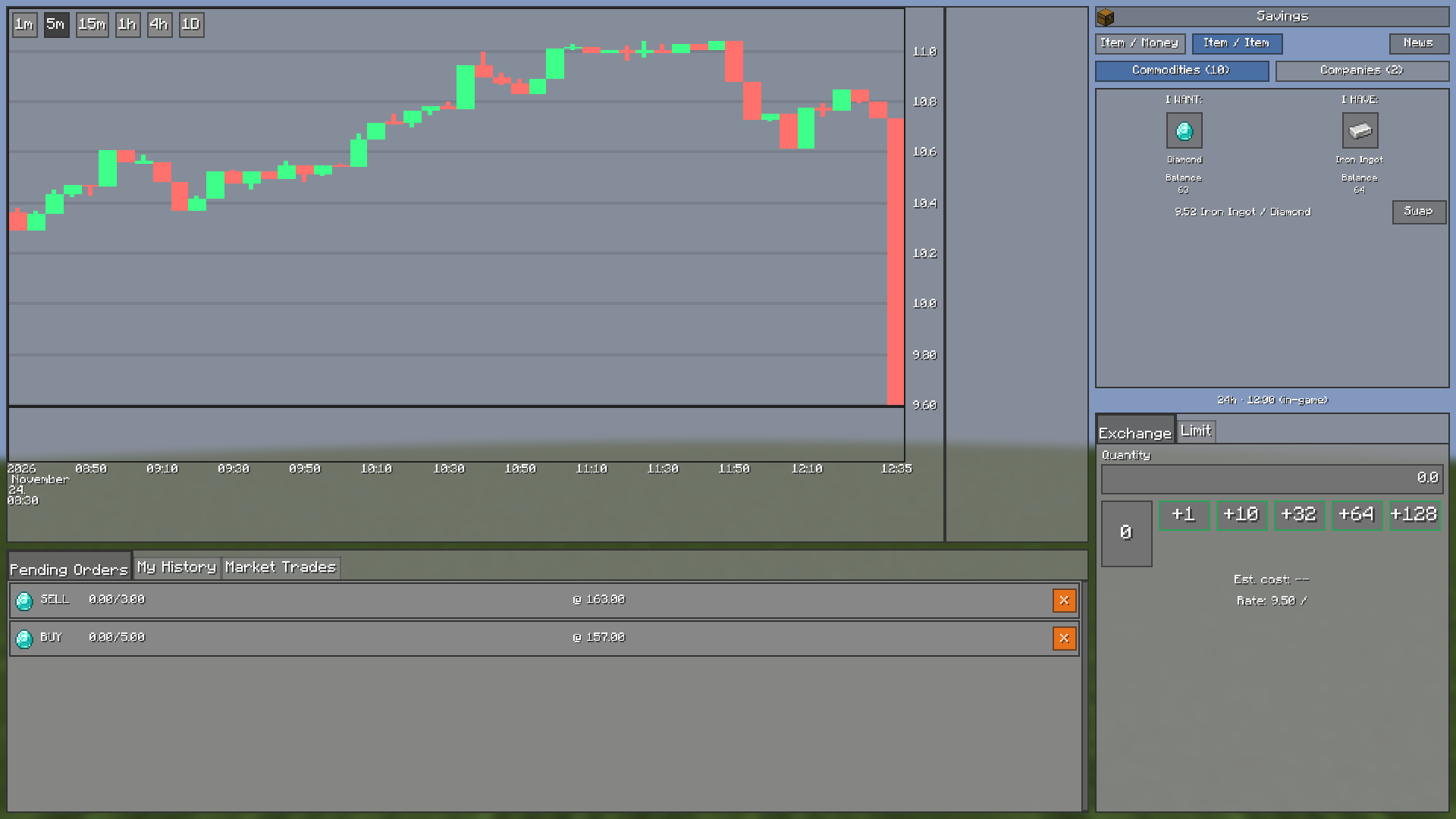
- Click Item / Item in the top bar.
- Next to I HAVE:, pick the item you pay with, for example iron.
- Next to I WANT:, pick the item you want to get, for example diamonds.
Each side shows your Balance of that item. Swap turns the pair around. When you pick an item, the list has two tabs: Commodities for normal items and Companies for company shares.
The exchange rate
The Rate says how many of your I HAVE items one I WANT item costs. For example, Rate: 12.5 Iron Ingot/Diamond means one diamond costs 12.5 iron ingots.
The rate comes from the two market prices:
So the rate changes whenever one of the two prices moves. In this mode the chart shows the rate, not a price in money.
Exchange: swap now
The Exchange tab works like a market order. It trades right away at the current rate.
- Type a Quantity. The quantity always counts I WANT items.
- Check Est. cost: about how many I HAVE items the swap costs.
- Click a button:
- Buy gets you the I WANT items and pays with your I HAVE items.
- Sell gives away I WANT items and gets you I HAVE items.
Like a market order, a big exchange can go through several price levels on both markets. The rate you get is then worse than the rate you saw.
Limit: swap at your rate
The Limit tab works like a limit order. It only trades at your rate or better.
- Type the Rate Limit. Click Market to fill in the current rate as a start.
- Type a Quantity of I WANT items.
- Click Buy Limit or Sell Limit.
- Buy Limit pays at most your rate.
- Sell Limit gets at least your rate.
The order waits until the rate reaches your limit. It shows on the chart as a line at its rate. You can drag it or cancel it, like a normal limit order. See Your orders on the chart.
Things to know
- Both markets must be open. If one of them is closed, your exchange order waits until both are open.
- Each market's max order size and the trade cooldown apply as for normal orders.
- The Est. cost turns red when you don't have enough I HAVE items for a buy.
Related pages
- Trading basics: the same order types with money.
- Price chart and order book: why the prices, and so the rate, move.
- Stock Market Display: show the rate of a pair on a wall.