News plugin
In the plugin list: NewsPlugin
This plugin publishes news events and moves the prices of the affected markets while an event runs: a sudden shock, a slow trend, a crash or a lasting change. Players read the headlines in the newspaper.
This page covers the plugin's settings. How events are written, the plugin window and the commands are in the News system section.
Use it when you want story-driven price moves on top of the normal random swing. It's optional: markets work without it.
How it moves prices
The plugin doesn't trade. After all other plugins have run, it multiplies the target price of every affected market:
factor of one event = 1 + effect now × item weight × Sensitivity
all events together = the factors multiplied, kept between 0.1 and 10
new target price    = target price × all events together
- Effect now is how strong the event is at this moment, for example
0.5for +50 % at its peak. - Item weight comes from the event: how strongly this item is affected.
- Sensitivity is the per-market setting below.
How it works with the other plugins
- Target Price Bot. The bot trades the real price towards the changed target, so how fast news shows on the chart depends on the bot. See Target Price Bot.
- Position in the list. News is applied in a separate last step, so its place in the list doesn't matter.
- Permanent events change the market's default price when they end. The fair price of the Net Flow plugin and its limits move with it.
The effect over time
Most events use one of three shapes. An event can change the times.
| Shape | Rise | Hold | Fade |
|---|---|---|---|
| shock | 5 s | 5 min | fast at first, gone after about 30 min |
| trend | 2 min | 10 min | evenly over 10 min |
| crash | 10 s | 2 min | fast at first, gone after about 90 min |
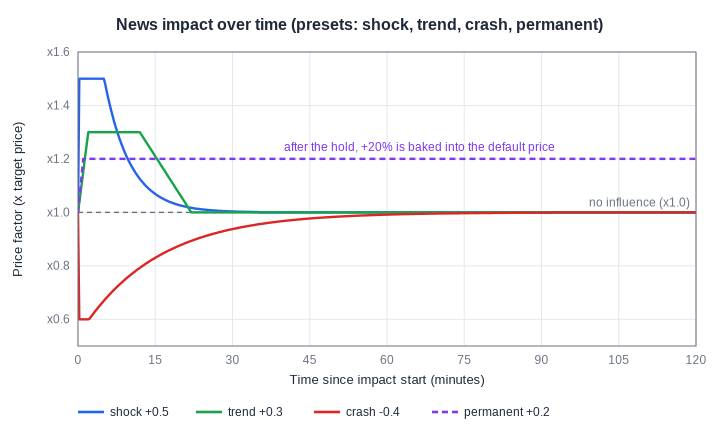
The shipped scheduler.json makes every event last three times as long and act half as strong as its event says. So the shock above moves the target to ×1.25 and holds it for 15 minutes. See scheduler.json.
Example: a diamond market with target price 160 and a shock of +50 % at its peak. At the peak, the target is 160 × 1.5 = 240. If a crash of −40 % runs on the same market, the factors multiply: 1.5 × 0.6 = 0.9.
A permanent event of +20 % changes the default price from 160 to 192 when it ends.
Changing the settings
In the Plugin Management screen (/stockmarket manage → Manage Plugins), click Open Plugin Settings in the plugin's entry. The Per-Market News Settings are on the right side of the window.
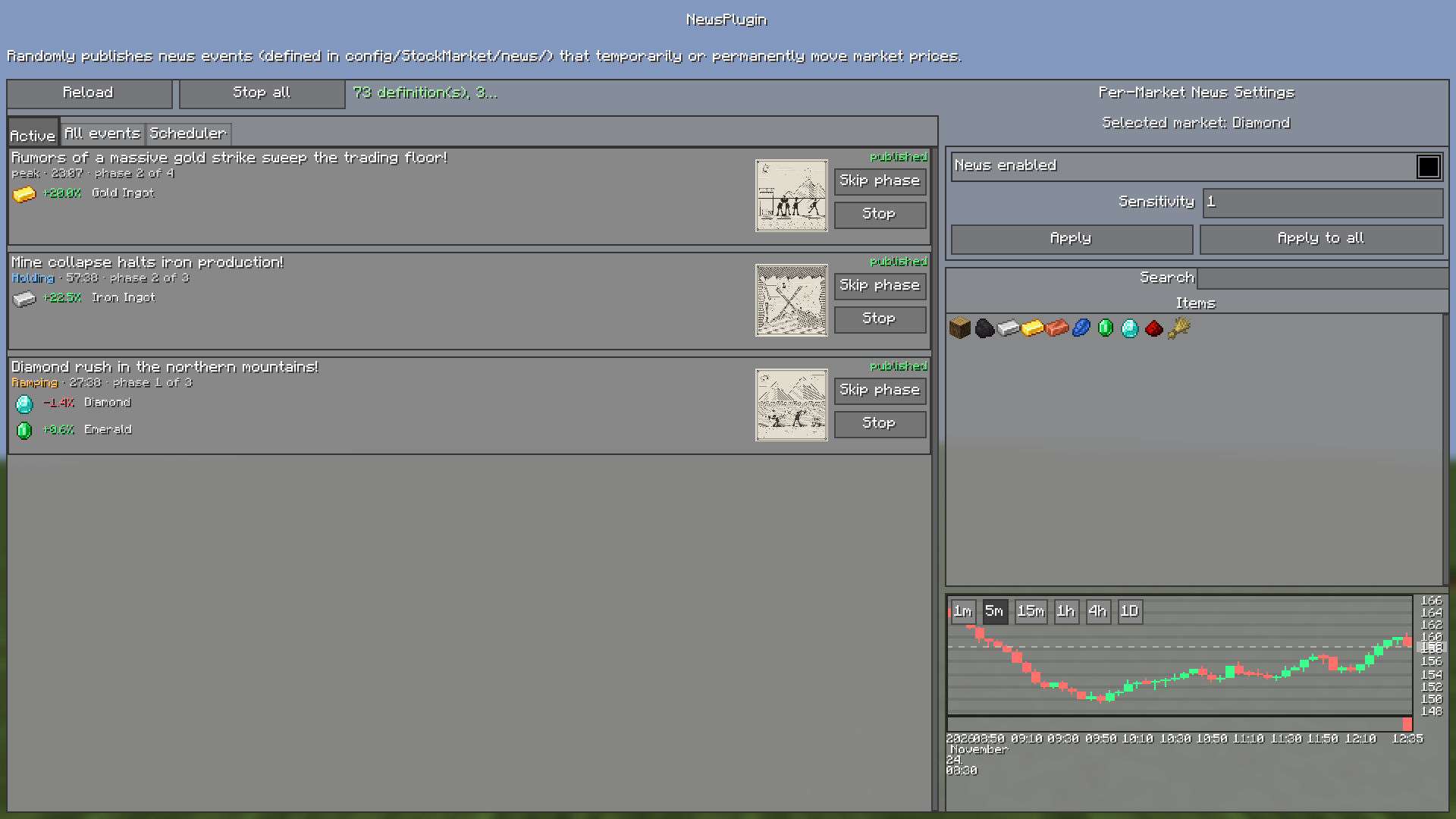
Select a market, change the values and click Apply for this market or Apply to all for every market of the plugin.
| Setting | Default | Range | What it does |
|---|---|---|---|
| News enabled | on | Whether this market takes part in news at all. | |
| Sensitivity | 1.0 |
any number; negative turns the effect around | How strongly news moves this market. |
The timing and the number of events at once are set for the whole server on the Scheduler tab of the same window, see Scheduler tab.
News enabled
When off, the market is left out of news completely. No event fires because of it, and running events stop moving its price at once. An event whose markets all have news off never fires.
Use it for markets whose price must stay predictable, such as a currency item, without removing the market from the plugin.
Sensitivity
Scales every news effect on this market, including the lasting change of permanent events.
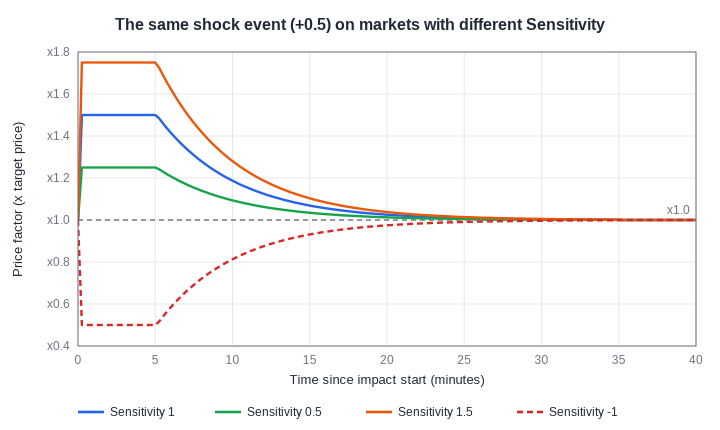
| Sensitivity | Event of +50 % at its peak | Event of −40 % at its peak |
|---|---|---|
0 |
×1.0 (no effect, but the market can still be picked) | ×1.0 |
0.5 |
×1.25 | ×0.8 |
1 (default) |
×1.5 | ×0.6 |
2 |
×2.0 | ×0.2 |
3 |
×2.5 | ×0.1 (the lower limit) |
-1 |
×0.5 (turned around) | ×1.4 (turned around) |
Tuning tips:
0.3to0.7for everyday items that should react to news only a little.1.5to2for items players should speculate on. Crashes get much deeper: from2.25, a −40 % crash hits the lower limit.0instead of turning News enabled off, if events for this market should still fire and show headlines, but its price must not move.- Negative values turn good news into bad news for this market. If only one event should work the other way round, give the item a negative weight in that event instead.
Generic settings
| Setting | Effect for this plugin |
|---|---|
| Enabled | When off, news stops moving prices and all timers pause: running events, cooldowns and the scheduler. Turned back on, they continue where they stopped. |
| Auto-subscribe | New markets are added automatically. Markets created with Ignore Plugin Autosubscribe are skipped. |
| Logger | Writes the plugin's messages (loading, planning, publishing) to the server log. |
| Market subscriptions | Only these markets can be moved by news. |
| Position in the list | No effect: news is applied after all other plugins. |
Related pages
- News system: how news works and the plugin window.
- News config files: the event files and
scheduler.json. - Target Price Bot: how fast the price follows the news.