Mod Settings
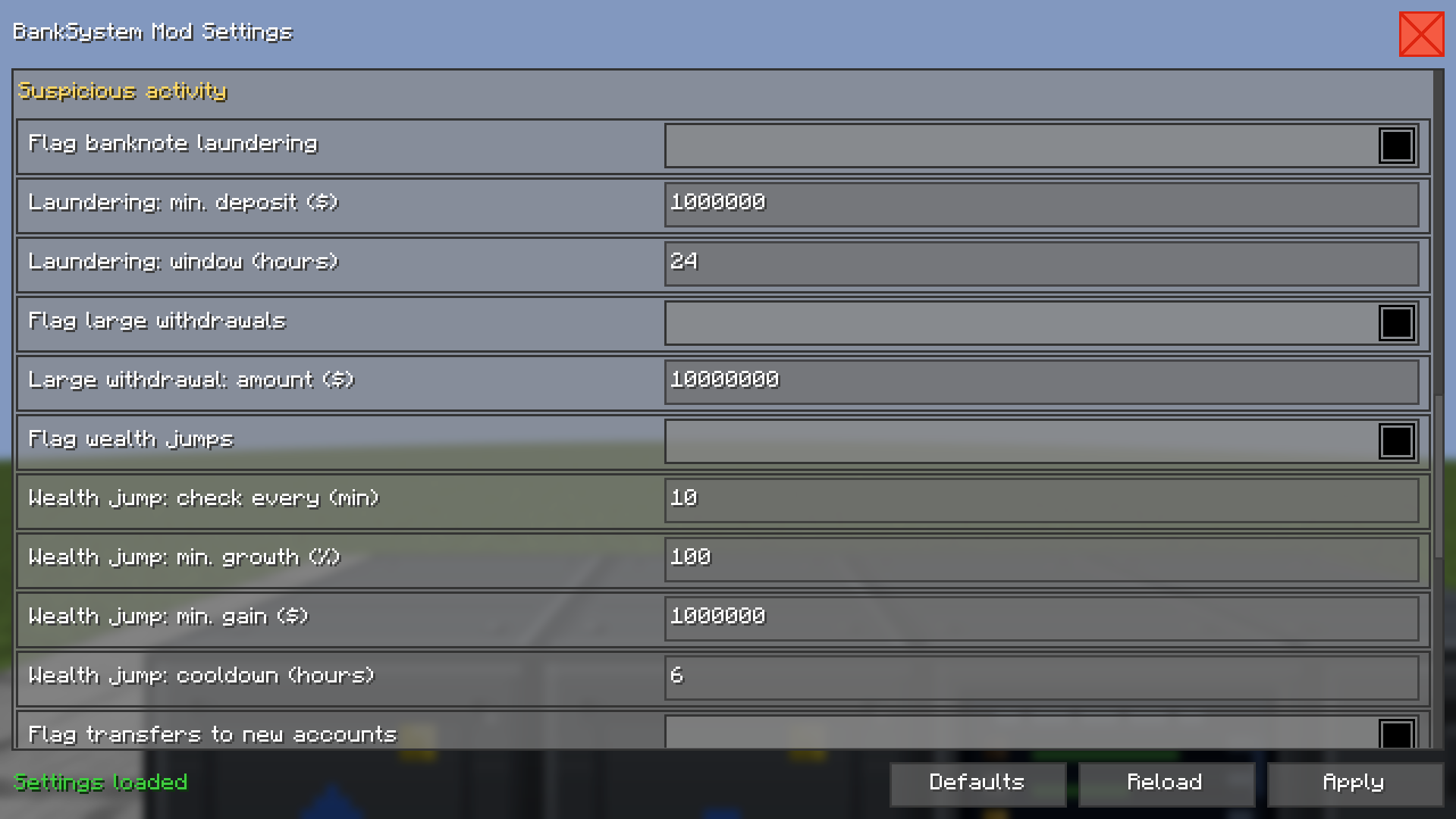
BankSystem keeps its server settings in one file per world. You change them in game in the BankSystem Mod Settings screen, or in the file while the server is stopped.
Opening the screen
- Run
/banksystem manage. You need the BankSystem admin flag and operator level 2, see Admins and permissions. - Click Mod Settings.
- Change the values and click Apply.
The button only shows on the master server of a network, and only for players with operator level 2. Settings take effect at once, except those marked ⟳ Restart required in the screen. Defaults fills in the default values and Reload reads the saved values again; neither saves anything until you click Apply. If you close the screen with changes you didn't apply, a popup asks whether to Save or Discard them.
The settings file
The file is <world>/data/BankSystem/settings.json. The server creates it with default values the first time the world loads.
Edit the file only while the server is stopped
The server rewrites the file every few seconds while it runs, so changes made to the file by hand are lost. Keep the JSON valid: if the file can't be read, BankSystem replaces it with a fresh default file.
Values outside their range are set to the nearest allowed value when the file loads. The server log gets one line for every value it changed, starting with settings.json value out of range, corrected.
Each server of a network has its own file. The screen only edits the master's file; to change a slave's file, stop the slave and edit it by hand. The item component lists are taken from the master.
Utilities
| Setting | Key | Default | Range | What it does |
|---|---|---|---|---|
| Autosave interval (seconds) | SAVE_INTERVAL_SECONDS |
5 |
1 to 86,400 | How often BankSystem saves its data while players are online. A short interval keeps the time small in which a crash could duplicate withdrawn items. |
| Balance snapshot interval (minutes) | BALANCE_SNAPSHOT_INTERVAL_MINUTES |
1 |
0 to 10,080 | How often the balance history of all accounts is recorded. A row is only written when a balance changed. 0 = off. |
| Balance snapshot heartbeat (minutes) | BALANCE_SNAPSHOT_HEARTBEAT_MINUTES |
60 |
0 or more | For accounts that don't change: write a row at least this often, so their chart line stays visible. 0 = off. |
| History retention sweep (minutes) | BALANCE_HISTORY_RETENTION_SWEEP_MINUTES |
60 |
0 or more | How often old history is thinned out. 0 = no regular sweep; old history is then only thinned out once at every server start. |
| Enable info logging | LOGGING_ENABLE_INFO |
on | Info messages in the server log. | |
| Enable warning logging | LOGGING_ENABLE_WARNING |
on | Warnings in the server log. | |
| Enable error logging | LOGGING_ENABLE_ERROR |
on | Errors in the server log. | |
| Enable debug logging | LOGGING_ENABLE_DEBUG |
off | Debug messages in the server log. Very chatty. | |
| Admin alerts on by default | ALERTS_DEFAULT_ON |
on | Chat alerts for admins who never ran /banksystem alerts on|off. See Alerts and suspicion flags. |
The retention sweep keeps every row of the last 24 hours, one row per 15 minutes up to 7 days, one per hour up to 30 days and one per day up to a year. Older rows are deleted.
Player
| Setting | Key | Default | Range | What it does |
|---|---|---|---|---|
| Starting balance (cents) | STARTING_BALANCE |
0 |
0 to 10^12 | Money a new player gets in their personal account, in cents: 100 = 1 dollar. |
| Max bank accounts per player | MAX_BANK_ACCOUNTS_PER_PLAYER |
3 |
−1 to 100,000 | How many accounts a player may create. The personal account and accounts a player was added to don't count. Founding a company uses one. -1 = no limit, 0 = none. |
| Max companies per player | MAX_COMPANIES_PER_PLAYER |
3 |
−1 to 100,000 | How many companies a player may found. -1 = no limit, 0 = none. |
Lowering a limit doesn't remove accounts or companies that already exist.
Bank
| Setting | Key | Default | Range | What it does |
|---|---|---|---|---|
| Allow all items | ALLOW_ALL_ITEMS |
off | On: every item can be banked except the built-in blacklist (bedrock, barrier, command blocks, coins below a dollar and a few more). Off: only the items on your allow-list. See Bankable items. | |
| Additional volatile components | ADDITIONAL_VOLATILE_COMPONENTS |
empty | Item data that the bank ignores, comma-separated, for example tfc:food. Needs a restart. See Bankable items. |
|
| Additional deposit-gated components | ADDITIONAL_DEPOSIT_GATED_COMPONENTS |
empty | Item data that the bank ignores but checks on deposit. Needs a restart. Same page. | |
| Download block update interval (ticks) | BANK_DOWNLOAD_BLOCK_UPDATE_TICK_INTERVAL |
20 |
1 to 1,200 | Time between two refills of a Bank Download Block. 20 ticks = 1 second. |
| Upload block update interval (ticks) | BANK_UPLOAD_BLOCK_UPDATE_TICK_INTERVAL |
20 |
1 to 1,200 | Time between two uploads of a Bank Upload Block. |
| Confirm pending item merge (one-shot) | CONFIRM_ITEMID_MERGE |
off | Approves a merge of bank items that the server refused at startup. Applied at the next start, then it switches itself off. | |
| Confirm pending world repair (one-shot) | CONFIRM_ITEMID_REPAIR |
off | Approves a repair of the item registry that the server refused at startup. Applied at the next start, then it switches itself off. | |
| Remove items of missing mods (one-shot) | CONFIRM_ITEMID_REMOVE_MISSING |
off | Removes the balances of items whose mod is gone, from every account, at the next start. BankSystem backs up its data first. Then it switches itself off. |
Only turn on a one-shot setting when the server log asks you to. See Troubleshooting.
Suspicious activity
These settings control the suspicion flags and the daily digest. They are read on the master server only. Money amounts are in whole dollars, not cents. See Alerts and suspicion flags for what each flag means.
| Setting | Key | Default | Range |
|---|---|---|---|
| Flag banknote laundering | LAUNDERING_FLAG_ENABLED |
on | |
| Laundering: min. deposit ($) | LAUNDERING_MIN_AMOUNT |
1000000 |
0 to 10^12 |
| Laundering: window (hours) | LAUNDERING_WINDOW_HOURS |
24 |
1 to 8,760 |
| Flag large withdrawals | LARGE_NOTE_WITHDRAWAL_FLAG_ENABLED |
on | |
| Large withdrawal: amount ($) | LARGE_NOTE_WITHDRAWAL_AMOUNT |
10000000 |
0 to 10^12 |
| Flag wealth jumps | WEALTH_JUMP_FLAG_ENABLED |
on | |
| Wealth jump: check every (min) | WEALTH_SWEEP_MINUTES |
10 |
0 to 1,440 (0 = never) |
| Wealth jump: min. growth (%) | WEALTH_JUMP_PERCENT |
100 |
1 to 100,000 |
| Wealth jump: min. gain ($) | WEALTH_JUMP_AMOUNT |
1000000 |
0 to 10^12 |
| Wealth jump: cooldown (hours) | WEALTH_JUMP_COOLDOWN_HOURS |
6 |
0 to 8,760 |
| Flag transfers to new accounts | NEW_ACCOUNT_TRANSFER_FLAG_ENABLED |
on | |
| New account: min. amount ($) | NEW_ACCOUNT_TRANSFER_AMOUNT |
1000000 |
0 to 10^12 |
| New account: max. age (hours) | NEW_ACCOUNT_AGE_HOURS |
24 |
1 to 8,760 |
| Flag money-supply growth | MONEY_SUPPLY_FLAG_ENABLED |
on | |
| Money supply: min. growth (%) | MONEY_SUPPLY_GROWTH_PERCENT |
10 |
1 to 100,000 |
| Money supply: min. growth ($) | MONEY_SUPPLY_GROWTH_AMOUNT |
10000000 |
0 to 10^12 |
| Money supply: cooldown (hours) | MONEY_SUPPLY_COOLDOWN_HOURS |
6 |
0 to 8,760 |
| Daily audit digest | DAILY_DIGEST_ENABLED |
on | |
| Digest: top gainers | DIGEST_TOP_N |
10 |
1 to 100 |
Integrations
In the screen, each integration is a section with an on/off box in its header. While it is off, its settings are greyed out.
| Setting | Key | Default | Range | What it does |
|---|---|---|---|---|
| Placeholders enabled | PLACEHOLDERS_ENABLED |
on | Placeholders for TAB and Placeholder API. Needs a restart. See Placeholders. | |
| Player placeholder refresh (ms) | PLAYER_REFRESH_MS |
1000 |
100 to 86,400,000 | How often the per-player values are updated. |
| Server placeholder refresh (ms) | SERVER_REFRESH_MS |
30000 |
100 to 86,400,000 | How often the server-wide values are updated, such as the richest players. |
| Richest players list size | TOP_COUNT |
10 |
0 to 100 | How many places the richest-players list has. Needs a restart. |
| Money format | MONEY_FORMAT |
$%s |
How money is shown in placeholders. %s stands for the number, for example %s €. A value without %s goes back to the default. |
|
| Sync admin flag with LuckPerms | SYNC_ADMIN_FLAG_WITH_PERMISSION |
off | Keeps the BankSystem admin flag and the LuckPerms node banksystem.admin in step. See Admins and permissions. |
|
| Numismatics integration | NUMISMATICS_ENABLED |
on | Lets players bind accounts to Numismatics. Off: bound money stays in Numismatics and can't move until you turn it on again. | |
| Lightman's Currency integration | LIGHTMANS_CURRENCY_ENABLED |
on | The same for Lightman's Currency. | |
| Discord feed | DISCORD_ENABLED |
off | Posts bank events to Discord. See Discord feed. |
Related pages
- Bankable items: which items the bank accepts.
- Alerts and suspicion flags: what the suspicious-activity settings do.
- Features you can turn on and off: every switch of both mods in one place.