Managing accounts
As a BankSystem admin you can open any bank account and change what is in it. You need the BankSystem admin flag, see Admins and permissions.
Opening an account
Use one of these:
/bank <player> manageopens the player's personal account.- In the Bank Settings screen, select an item and click Manage next to an account.
- In creative mode, right-click a player while holding Banking Software. This also needs the permission
banksystem.admin.software.
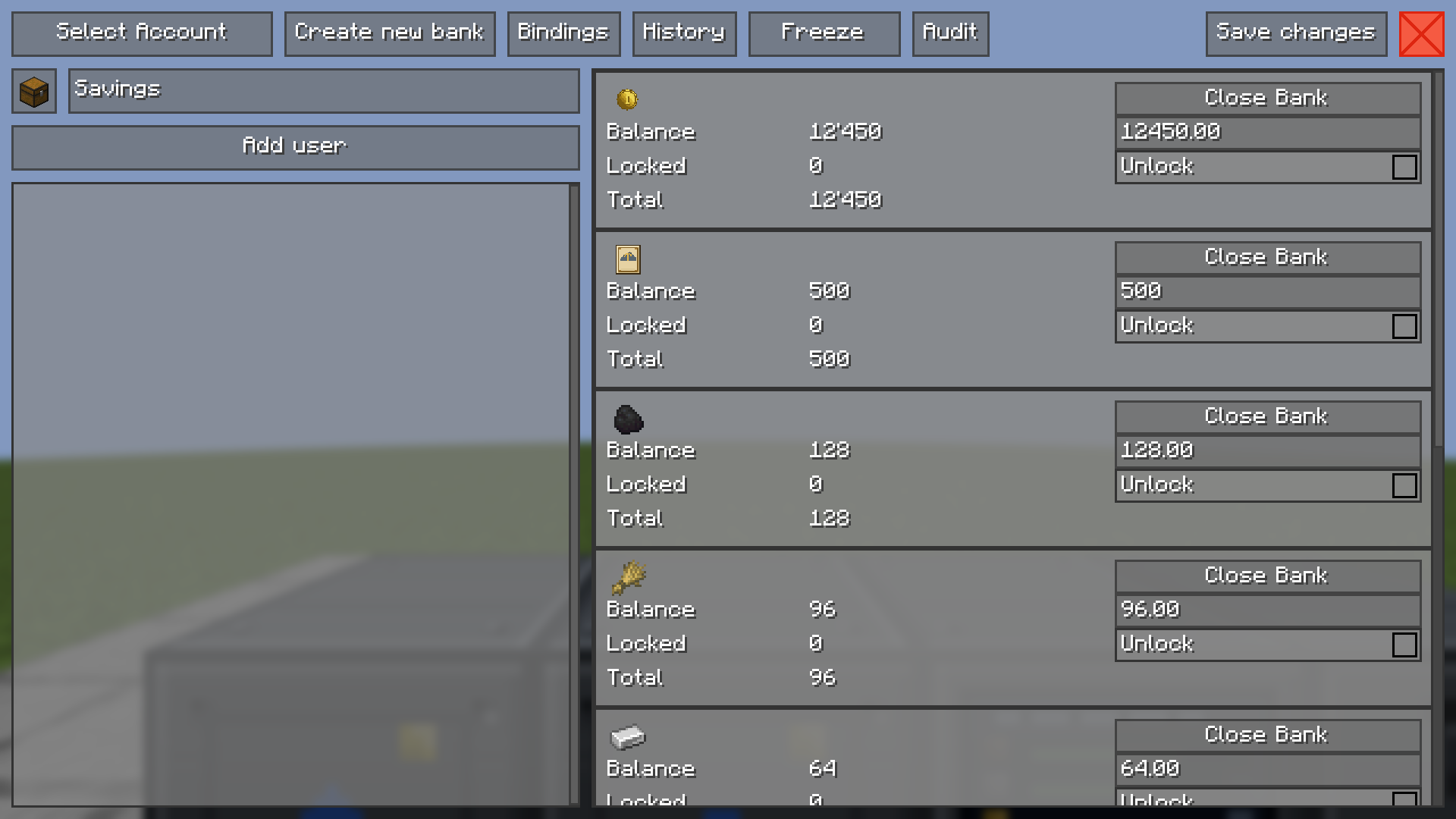
The screen is the same management screen players see, with extra admin controls. To only look at a balance, use /bank <player> show.
What you can change
Each item in the account has one row with its Balance, Locked and Total.
| To | Do this | Saved |
|---|---|---|
| Change a balance | Type the new amount into the balance field. | On Save changes |
| Add an item to the account | Click Create new bank and pick the item. | At once |
| Remove an item from the account | Click Close Bank on its row. The row turns red. The player loses all of that item. | On Save changes |
| Release a locked amount | Tick Unlock on the row. The locked amount becomes free balance again. | On Save changes |
| Freeze or unfreeze | Click Freeze (or Unfreeze) in the header. A * marks the unsaved change. | On Save changes |
| Look at the account's history | Click Audit. See Investigating in game. |
Company share balances can only be lowered, in whole shares, and not below the locked amount. The removed shares are destroyed. See Companies and shares.
Locked amounts
Part of a balance can be locked: reserved and not spendable. Two things lock amounts:
- StockMarket locks the money or items of open orders until they fill or are cancelled.
- BankSystem locks an amount for a moment while a Bank Terminal, a Download Block or crafting takes it out. If it can't tell whether the items were delivered, for example because the master server didn't answer, the amount stays locked. Releasing it blindly could pay out the same items twice.
Find out why before you unlock
Unlocking an amount that an open order or a pending transfer still needs can break that order or give a player items twice.
Before you tick Unlock:
- Run
/banksystem audit <player>and look at the entries from when the amount was locked. A withdrawal of the same amount means the items were delivered and paid for. - Search the server log for
left locked for the admin,Un-debited craftorunknown outcome. These lines name the account, the item and the amount. - If StockMarket is installed, check the player's open orders. Their amounts are locked too.
Freezing an account
A frozen account keeps everything in it, but nothing moves in or out: no deposits, withdrawals, cash, transfers, automation blocks, crafting with bank items, payouts or dividends. Players get a chat message, and the account shows a grey Frozen marker. Your admin edits still work. If StockMarket is installed, freezing also cancels every open order of the account, Item / Item orders included, and the money and items they had reserved go back into the account. New orders are refused until you unfreeze it.
Freeze an account in the management screen, or by command:
Without on or off, the command switches the state. It also works from the master server's console. Every freeze and unfreeze is recorded in the transaction ledger.
Money commands
| Command | What it does |
|---|---|
/money add [player] <amount> |
Adds money to a player's personal account, or to yours. |
/money remove [player] <amount> |
Removes money. |
/money set [player] <amount> |
Sets the balance. |
/bank <player> show |
Shows a player's balances in chat. |
Amounts are in dollars, for example 12.50.
Related pages
- Investigating in game: find out what happened in an account.
- Bankable items: the Bank Settings screen.
- Bank accounts: the player's view of accounts.