News system
News events are headlines that move market prices. From time to time the server publishes a story, for example Mine collapse halts iron production!, and the prices of the affected markets react. They rise or fall, hold for a while and then return to normal. Some stories change a price for good.
Every story is a JSON file on the server, so you decide which headlines exist, how strongly they move prices and which markets they hit. StockMarket ships 73 ready-made events, see Default events. Players read the news in the newspaper, see Market news.
How a news event works
The NewsPlugin runs the news. Like the other price plugins, it works per market. At random times it picks an event, publishes the headline and pushes the prices of the affected markets.
A simple event follows three phases:
- Ramp-up. The effect grows from zero to its peak.
- Hold. The effect stays at its peak.
- Reversal. The effect goes back to zero. A permanent event skips this phase: its change is written into the market's default price and stays, also after a restart.
The peak is a percentage: 0.5 means 50% above the normal price, -0.4 means 40% below. Because it is a percentage, the same event works on a cheap and an expensive market.
Advanced events can tell a longer story in several steps, pick one of several story variants at random, depend on earlier events and start follow-up events. See Advanced events.
How it moves the price
News doesn't set prices directly. It works together with the other plugins:
- The Net Flow plugin and the Volatility plugin work out the market's target price as usual.
- The NewsPlugin multiplies that target price by the effect of all running events on the market.
- The Target Price Bot places real orders to move the price toward the new target.
So the price moves through real trades, and players can push against it or follow it.
Which markets react
An event lists the items it affects. It only moves a market if all of these are true:
- the event's item list matches the market,
- the market is subscribed to the NewsPlugin,
- News enabled is on for that market.
Sensitivity scales the effect per market: 0.5 halves every event, 2.0 doubles it. Both settings are in the plugin window, see News plugin.
Limits
- All running events together can move a market to at most 10 times and at least 0.1 times its normal target price.
- By default at most 3 events run at once, and at most 1 per market. You set this in scheduler.json.
- Event time only runs while the server runs. A paused or stopped server doesn't use up an event, a cooldown or a delay. Turning the NewsPlugin off freezes all running events.
The News plugin window
Open it with /stockmarket manage → Manage Plugins, then click Open Plugin Settings in the NewsPlugin entry. You need the StockMarket admin flag, see Admins and permissions.
The window has three tabs: Active, All events and Scheduler. Above them are two buttons for all events:
| Button | What it does |
|---|---|
| Reload | Reads all news files again and shows the report, like /stockmarket news reload. |
| Stop all | Stops every running event, like /stockmarket news stop all. |
On the right are the Per-Market News Settings (News enabled, Sensitivity), the market list and a price chart of the selected market. The result of every button shows in a status line at the top.
Active tab
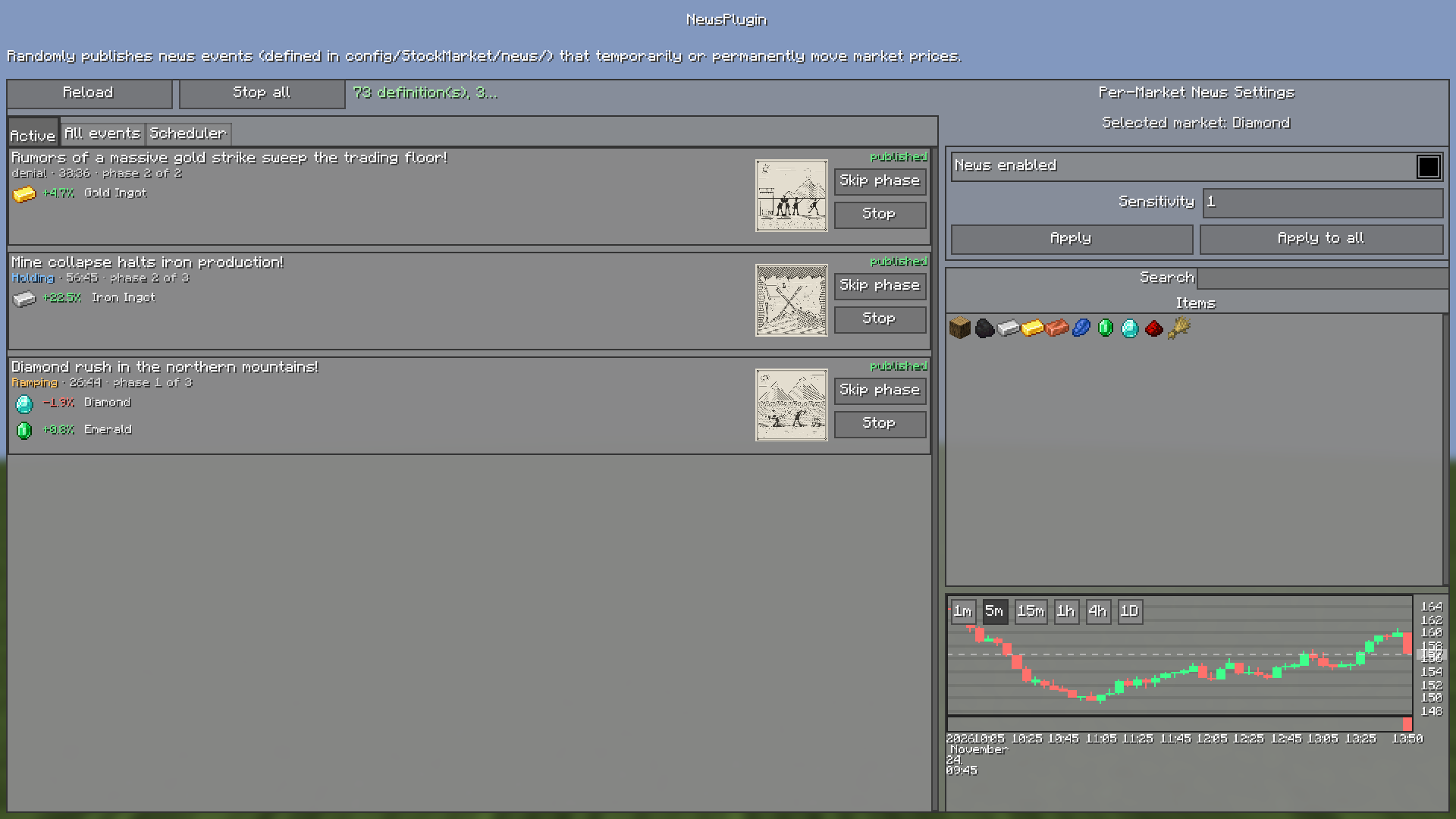
One row per running event. Each row shows the phase (Pending, Ramping, Holding, Reverting, Permanent), the time left, whether the headline is out yet and the current effect on each market, for example +25%. Events with several steps show the step name and phase N of M. Click a market icon to select that market on the right.
Each row has two buttons:
- Skip phase jumps to the next phase or step. Skipping the last one ends the event normally.
- Stop cancels the event at once. Its effect is removed and its cooldown starts again.
Click anywhere else on the row to open the event details.
All events tab
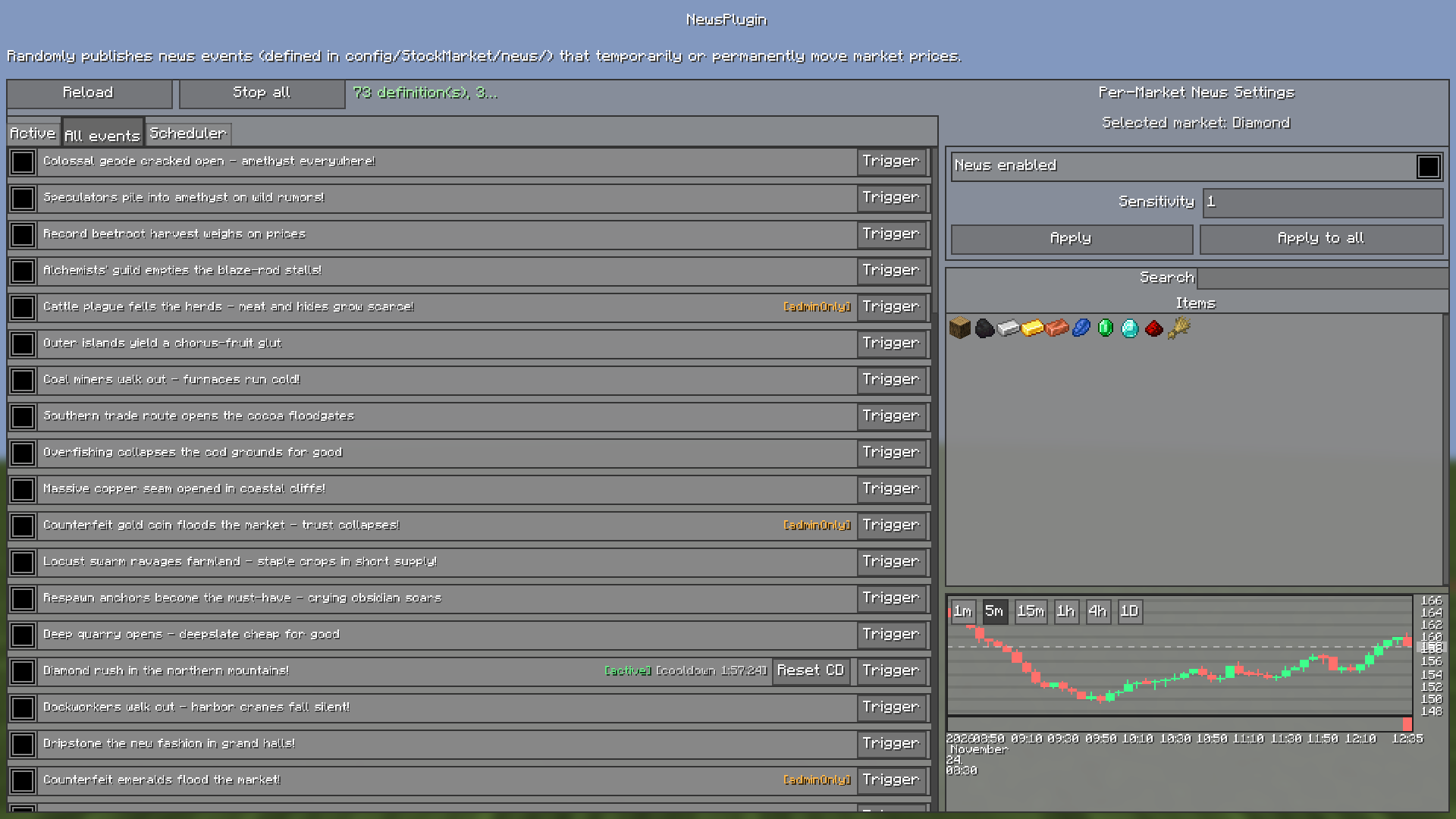
One row per loaded event, with its headline and these markers: [adminOnly], [active], [disabled] and [cooldown …].
- The checkbox on the left turns the event on or off. A disabled event never fires, not even by Trigger.
- Trigger starts the event now on all its markets. If its cooldown is still running or its requirements aren't met, a dialog asks first.
- Reset CD clears the cooldown. It only shows while the event is cooling down.
Scheduler tab
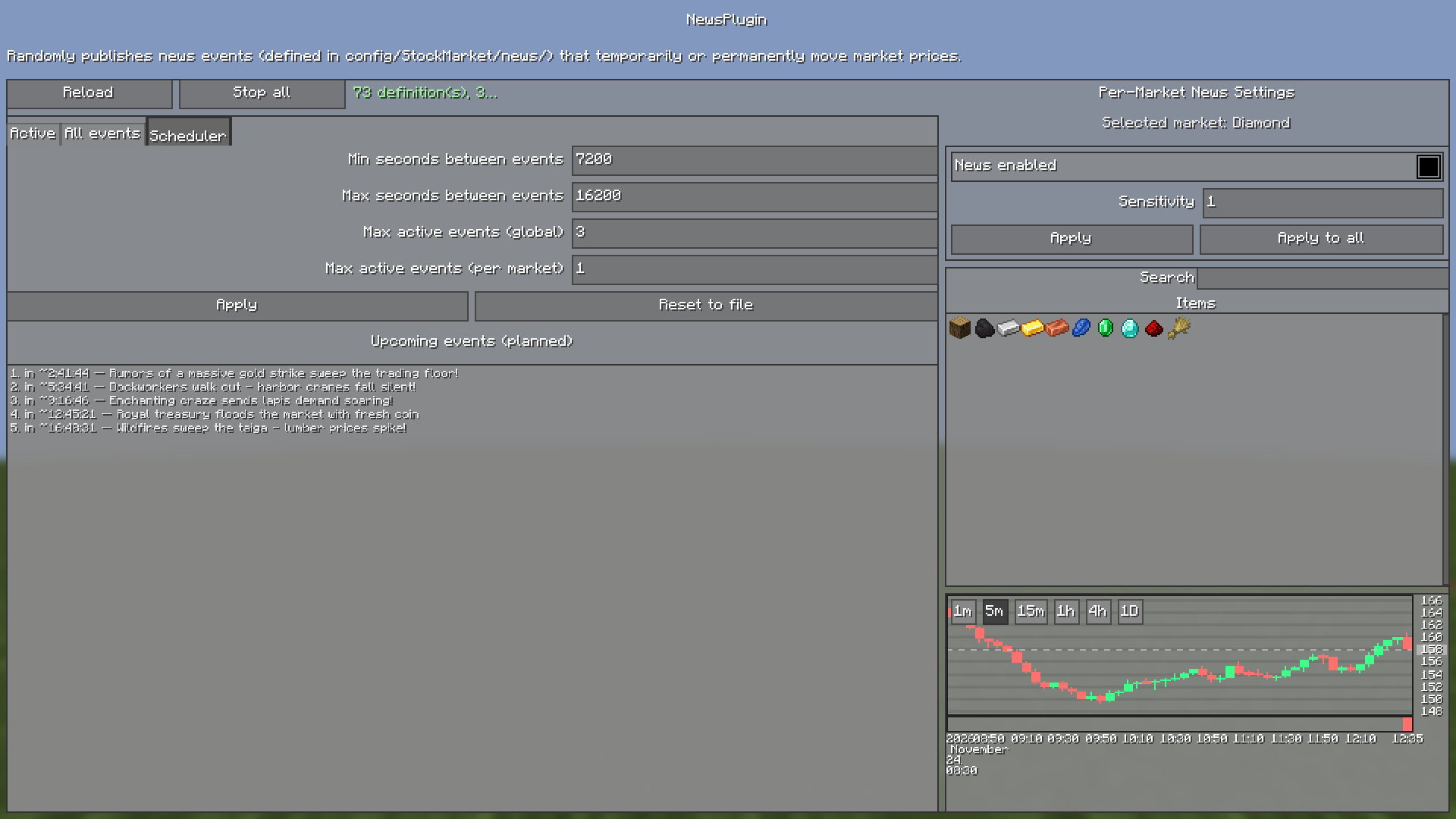
Four fields change the scheduler while the server runs: Min seconds between events, Max seconds between events, Max active events (global) and Max active events (per market). A value that differs from the file is marked (overridden).
- Apply saves the values you changed. They stay until you reset them, also through a reload.
- Reset to file removes all changes, so the values from scheduler.json apply again.
Below the fields, Upcoming events (planned) shows the next planned slots. The server checks each one again when it is due, so a planned event can still be skipped or replaced. Some slots show (event picked at trigger time).
Event details
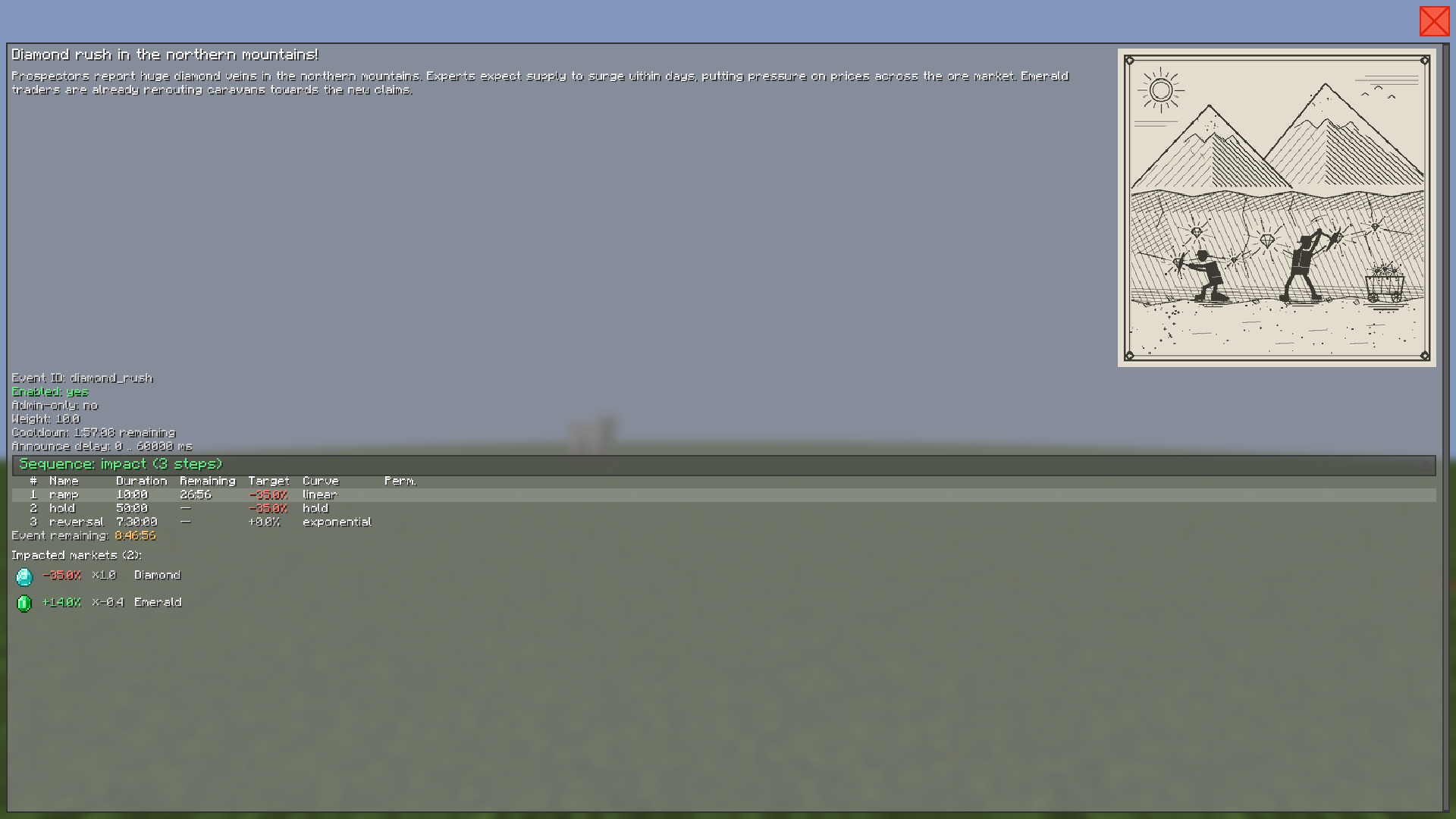
Click an event in the Active or All events tab, or a planned event in the Scheduler tab, to see everything about it:
- headline, text and picture,
- whether it is enabled or admin-only, its weight, its cooldown and its announce delay,
- its steps with duration, target, curve and a mark for permanent steps,
- the markets it would move, with their percentage,
- its trigger requirements, each marked as met or not, and its follow-up events.
Press Esc to go back to the plugin window.
Master and slave servers
News runs only on the master. The master picks the events, moves the prices and keeps the history. Headlines reach the players on every slave, and the newspaper on a slave reads the master's history. The news commands work on slaves too; they are passed to the master. Only the tab completion of event names is missing on slaves. See Master and slave servers.
What is saved
Everything survives a restart:
- Running events continue where they stopped, with the values they started with, even if you changed or deleted their file in between.
- Cooldowns, the scheduler timer and waiting follow-up events continue too.
- The news history, the published pictures and the event registry are in
<world>/data/StockMarket/News/. See Data files and backups. - A permanent change is written into the default price once. A restart never applies it twice.
A new world starts with the NewsPlugin switched on, and it subscribes every new market by itself (Auto-subscribe).
Related pages
- News config files: where the event files live.
- Writing your first event: step by step.
- News commands: every
/stockmarket newscommand. - News plugin: the per-market settings.