Target Price Bot
In the plugin list: TargetPriceBot
This bot moves the real price towards the target price. The Volatility plugin sets the target, and the News plugin changes it during news events. The bot places market orders against the bot orders in the order book until the price gets there.
Use it on every market with a Volatility plugin. Without the bot, the target is worked out but nothing moves the price towards it. It only works on markets with Enable Virtual Orderbook switched on.
What the bot does
About four times per second, for each market:
- It measures the gap: how far the target is from the current price, in percent.
- A controller turns the gap into an urgency between 0 and 1. A big gap means high urgency.
- It buys (target above) or sells (target below) that share of the bot orders between the price and the target.
Its orders never go past the target. Player orders in the way do get filled by them.
After a player trade
When a player buys or sells a lot, the bot doesn't snap the price straight back. Players should see the effect of their trades:
- Hold and return. The bot holds the price near where the player pushed it, and lets it return to the target over about the Reversion Time (10 minutes by default). On the way back the price swings a little around its path, like a real price. More trades in the same direction don't restart the return.
- Pause on empty gaps. A large order can sweep away all bot orders near the price. For about a minute afterwards, the bot doesn't trade into such an empty stretch. The exact pause is random, so players can't time it.
- Slow start. After a player trade, the bot's orders start small and grow over three minutes. The price starts to slide slowly and then faster.
- Band. The bot holds the price at most between 25 % and 3 times the fair price of the Net Flow plugin. A player who pushes the price beyond that band sees it come back to the band edge first.
How it works with the other plugins
- Volatility plugin. Needs its target on the same market.
- Order book volume plugin. The bot trades against the bot orders of the Order book volume plugin. A deeper book means bigger bot orders, so Volume Scale doesn't change how fast the bot reaches the target.
Changing the settings
The bot has its own screen. In the Plugin Management screen (/stockmarket manage → Manage Plugins), click Open Plugin Settings in the bot's entry.
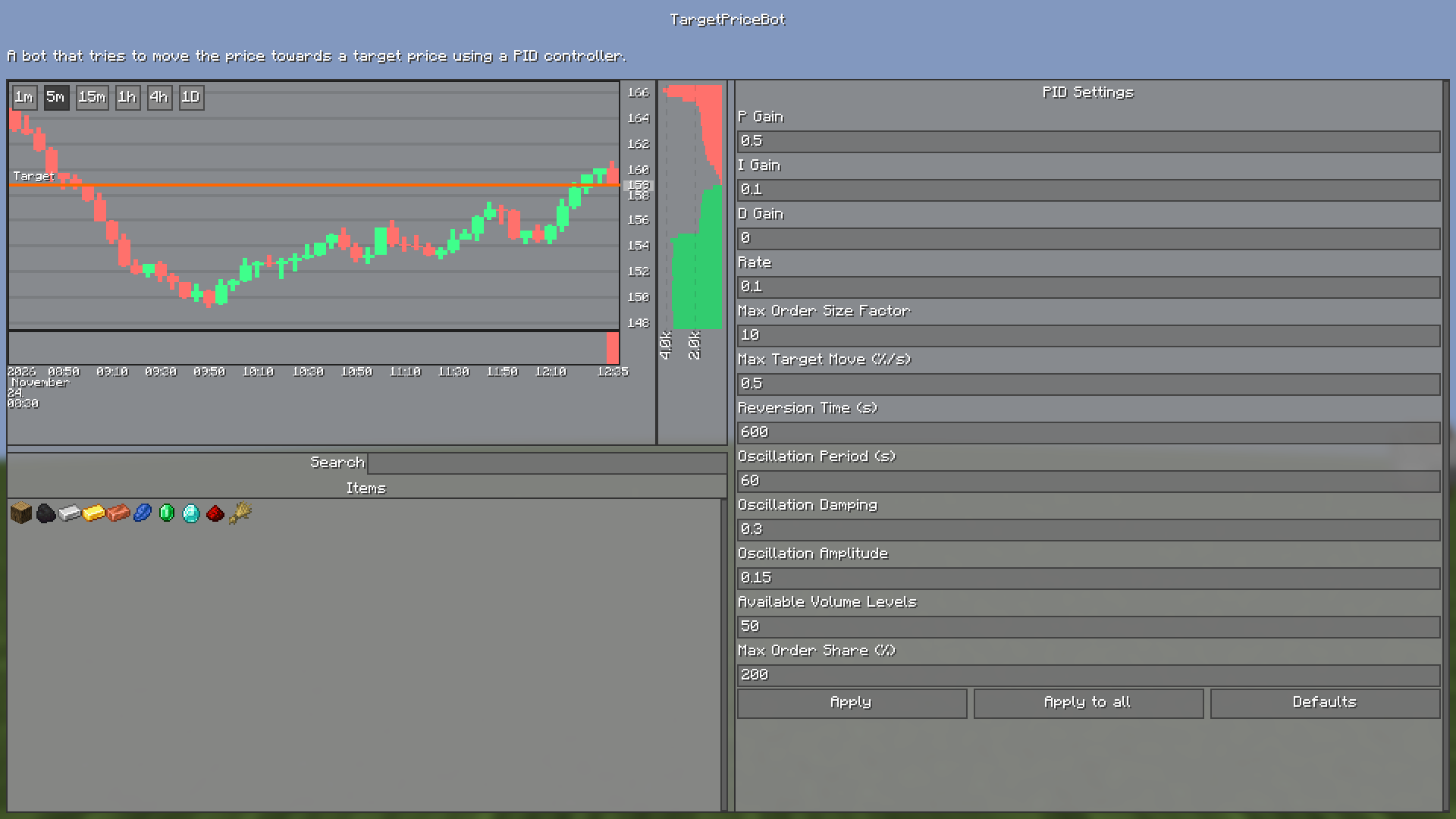
The screen shows the chart and order book of the selected market at the top left, the market list below it and the PID Settings on the right. Select a market, change the values and click Apply for this market or Apply to all for every market of the bot. Defaults fills in the default values; nothing changes until you apply.
Settings
All settings are per market. Use only values of 0 or more: negative gains make the bot trade away from the target.
| Setting | Default | What it does |
|---|---|---|
| P Gain | 0.5 |
How hard the bot reacts to the gap right now. |
| I Gain | 0.1 |
Builds up while a gap stays, and closes small leftover gaps. |
| D Gain | 0 |
Reacts to how fast the gap changes. |
| Rate | 0.1 |
The most the I Gain part can add. Not a speed. |
| Max Order Size Factor | 10 |
Largest bot order per step, as a multiple of the market's Max order size. 0 = no limit, also when the market has no limit. |
| Max Target Move (%/s) | 0.5 |
How fast the bot's target may follow a jump of the target price, in percent per second. 0 = no limit. |
| Reversion Time (s) | 600 |
How long the price takes to return after a player push. 0 = off: the bot chases the target at once. |
| Oscillation Period (s) | 60 |
Length of one swing on the way back. |
| Oscillation Damping | 0.3 |
How fast the swings die out, 0 to 1. 0 = they keep going, 1 = no overshoot. |
| Oscillation Amplitude | 0.15 |
Size of the first swing, as a share of the player's push. The price never goes past the target or beyond the player's price. |
| Available Volume Levels | 50 |
How many price levels with bot orders the bot counts when it sizes an order. More levels let it bring the price back faster. |
| Max Order Share (%) | 200 |
The largest order after the slow start, in percent of the counted volume. Above 100 % the bot orders past the counted levels, but never past its target or its order limit. |
The controller
The gap is measured in percent of the price, so the same values work on cheap and expensive items:
I part   = I part + gap × seconds × I Gain, kept between −Rate and +Rate
output   = P Gain × gap + I part + D Gain × (change of the gap per second)
urgency  = output, smoothed and kept between 0 and 1
With the defaults, a gap of 4 % or more is closed in one go. A gap of 1 % is about a quarter closed after the first step and three quarters after one second. When the target is less than one cent away, the bot waits.
P Gain
How tightly the price sticks to the target:
- High: a player sells a big stack, and within a second the bot buys the price back up. Player trades leave almost no trace on the chart.
- Low: player trades push the price away, and it drifts back over seconds to minutes. The market feels more player-driven.
I Gain and Rate
I Gain closes small gaps that stay, which P Gain alone is too weak for. Too high makes the price overshoot and swing around the target. Rate caps it: with 0.1, this part alone closes at most about a tenth of the gap per step. Raise both if a market trails its target for long; lower them if the price overshoots after long one-sided moves.
D Gain
Damps overshoot. The output is already smoothed, so 0 works for almost every market. Avoid large values: when a news event moves the target suddenly, they cause a short burst of very hard trading.
Tuning checklist
- Start with the defaults and watch how the price follows the target line in the chart.
- The price lags far behind the target: raise P Gain. If the bot's target follows a news jump too slowly, raise Max Target Move (%/s).
- The price overshoots and swings around the target: lower I Gain or Rate, then P Gain.
- Players say their trades have no effect: raise Reversion Time (s) or lower P Gain.
Generic settings
| Setting | Effect for this plugin |
|---|---|
| Enabled | When off, the bot stops trading and the price only moves through players. Settings and markets are kept. |
| Auto-subscribe | New markets are added automatically. Markets created with Ignore Plugin Autosubscribe are skipped. |
| Logger | Writes a line for every bot order to the server log. Very chatty: only for finding a problem. |
| Market subscriptions | The bot only trades on these markets. |
| Position in the list | After the Volatility plugin (the default). See Plugins. |
Related pages
- Volatility plugin: where the target comes from.
- Order book volume plugin: the bot orders it trades against.
- Net Flow plugin: the fair price and the band.