Web interface
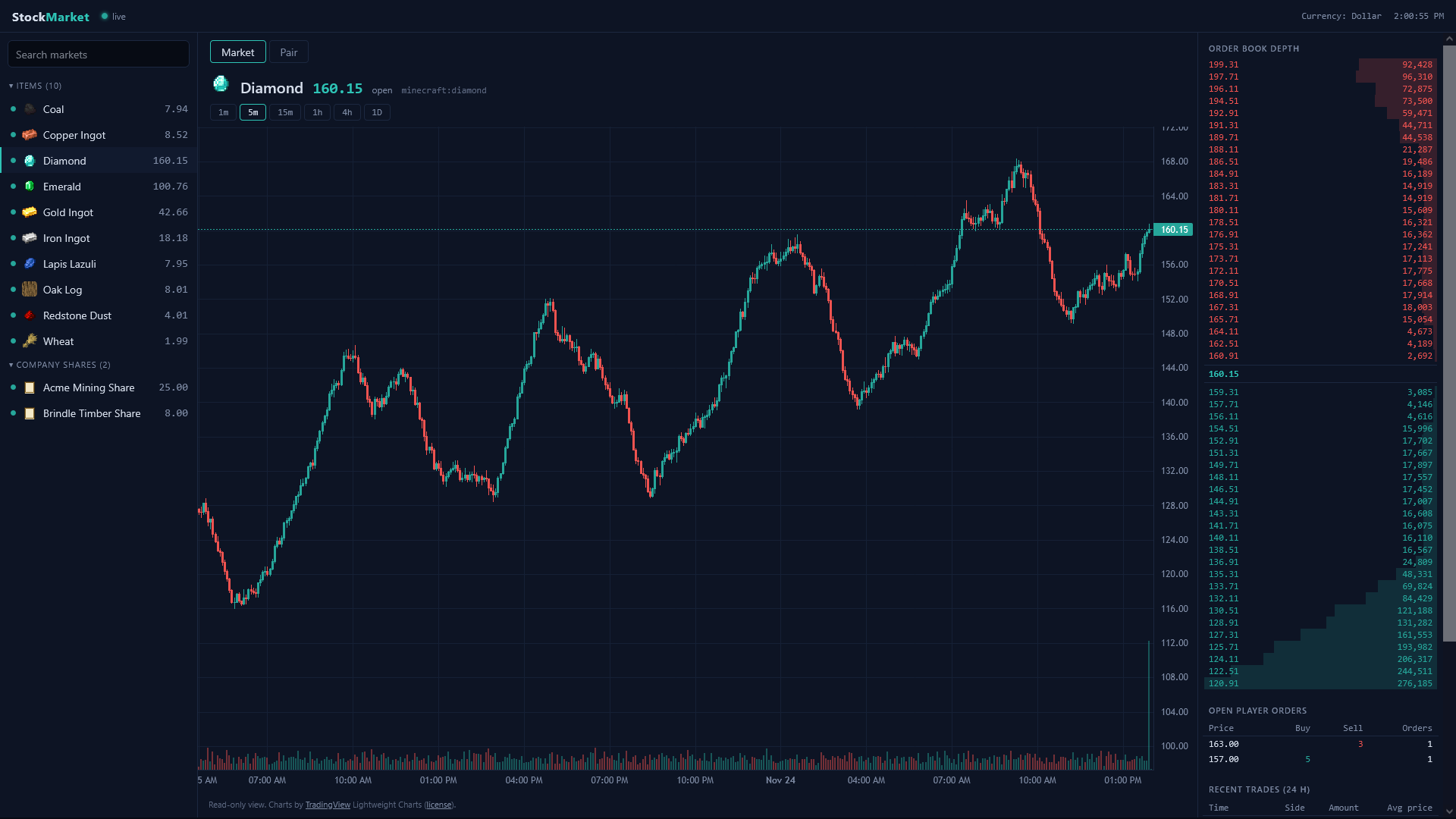
StockMarket can show its markets on a web page. Players open it in a browser and follow prices without joining the game. The page only shows; nobody can trade or change anything through it.
Turning it on
- Open the StockMarket Mod Settings:
/stockmarket manage→ Mod Settings. - In Integrations, turn on Web interface (read-only).
- Set the Port, default
8090. - Click Apply. The page starts at once, no restart needed.
The page is then at http://<server address>:<port>/, for example http://play.example.com:8090/. The server log shows [StockMarket Web] serving on … when it runs.
The port must be between 1024 and 65535. It can't be the game port, the network port or a port that another program uses. The Mod Settings refuse such a port before saving.
Everyone who can reach the port can see the page
The page has no login. Only open the port in your firewall if everyone may see your markets. The page never shows player names, UUIDs, account numbers or order IDs.
What the page shows
- The market list on the left, with a search box. Click a market to open it.
- The price chart, as Candles or as a Line, with time frames from 1 minute to 1 day. With Candles: use in-game time on, the time frames are in-game hours, days and weeks instead.
- Pair: the price of one item in another, as in item for item trading. Choose I have and I want.
- Order book depth: how many items are offered around the current price.
- Open player orders: player orders grouped by price, without names.
- Recent trades (24 h): time, buy or sell, amount and average price.
Prices and the order book update every 2 seconds, the trades every 5 seconds.
Where it runs
| Server | Web interface |
|---|---|
| A single server | On all network addresses, so other computers can reach it. |
| Master of a network | The same. It shows all markets of the network. |
| Slave | Never. Players use the master's page. |
| Singleplayer | Only on your own computer, at http://127.0.0.1:<port>/. |
If the page doesn't open
| Problem | Fix |
|---|---|
| The log says could not bind port | Another program uses the port. Choose another one. |
| It works on the server machine but not from outside | Open the port in the firewall, or forward it on your router. Some hosting providers only allow ports they assign to you. |
| Nothing in the log | The setting is off, or this server is a slave. |
Related pages
- Features you can turn on and off: every switch of both mods.
- Placeholders: live prices in game.
- Master and slave servers: which server does what.