Bankable items
Players can only put items into the bank that you allow. A new world allows money, iron ingots, gold ingots, diamonds, emeralds and coal. Creating a StockMarket market for an item allows that item too.
You need the BankSystem admin flag for everything on this page, see Admins and permissions.
The Bank Settings screen
Run /banksystem manage. The Bank Settings screen opens.
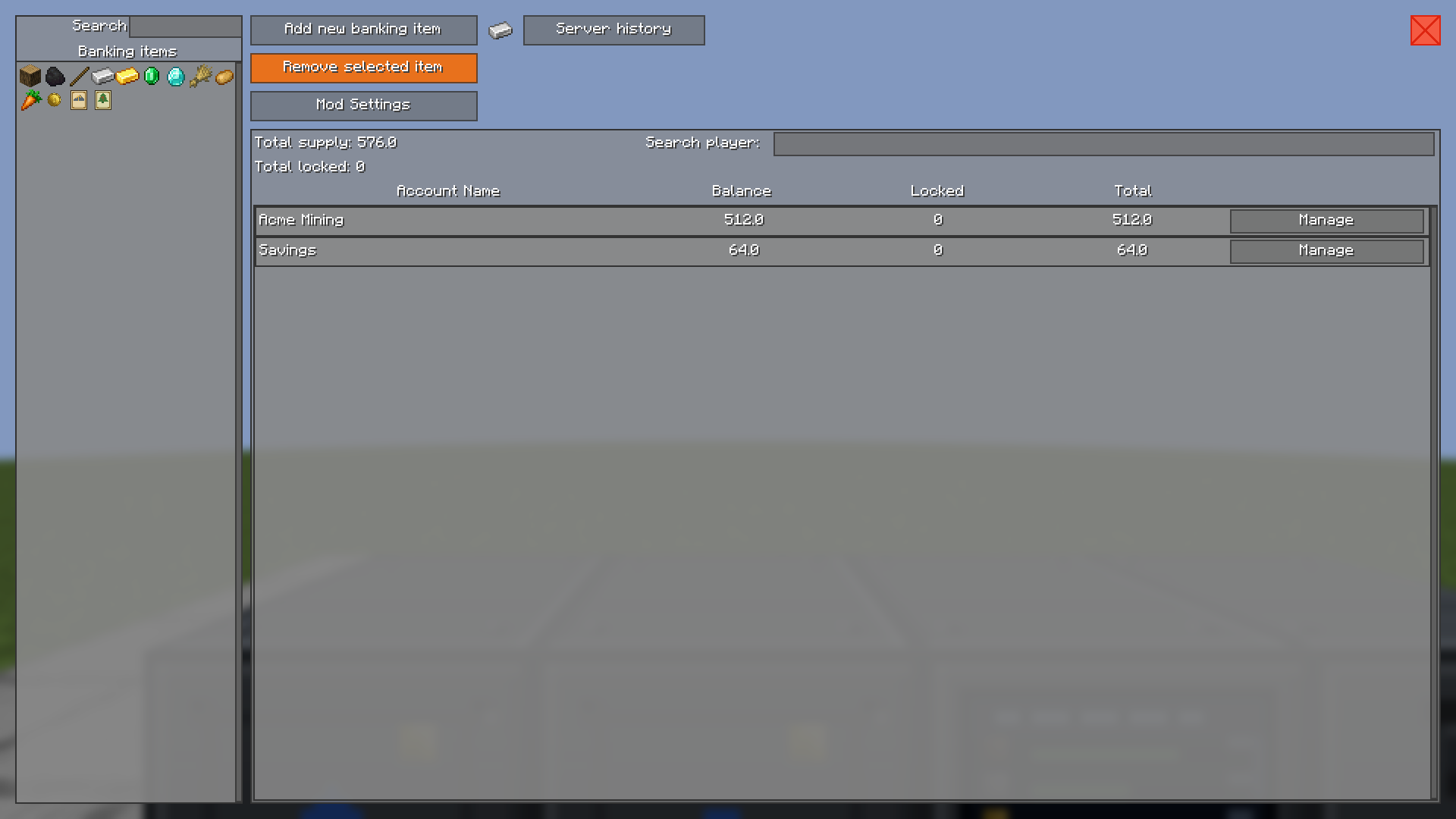
- Banking items on the left lists every allowed item. Click one to see its Total supply (all players' balances together) and Total locked (reserved in open market orders), and every account that holds it.
- Add new banking item opens an item picker. Pick an item to allow it.
- Remove selected item removes the selected item from the bank, after a confirmation.
- Mod Settings opens the Mod Settings.
Commands
| Command | What it does |
|---|---|
/banksystem allowItem <item id> |
Allows the item, for example minecraft:copper_ingot. |
/banksystem allowItemInHand |
Allows the item in your main hand, with its exact data. |
/banksystem disallowItem <item id> |
Removes the item from the bank. |
/banksystem disallowItemInHand |
Removes the item in your main hand from the bank. |
Removing an item deletes it from every account
When you remove an item, its balance is deleted from every player's account. The players don't get the items back. This can't be undone. Ask players to take the item out first.
Allowing all items
Large modpacks have too many items to allow one by one. Turn on Allow all items in the Mod Settings. Then every item can be banked except a built-in blacklist: bedrock, barriers, structure voids, command blocks, the debug stick, the knowledge book, the coins below one dollar and every banknote from $5 to $1,000,000. The blacklist always applies. Items you removed from the bank also stay blocked until you allow them again.
Your allow-list stays saved. If you turn the setting off again, the old list applies again.
Items with extra data
The bank tells items apart by their data, for example a name given in an anvil. A renamed item is a different bank item from the plain one, so it needs its own entry: hold it and run /banksystem allowItemInHand. Damaged or enchanted items can't be banked at all; the Bank Terminal and the Upload Block skip them.
To keep players from filling the item list, each player can add at most 256 new item variants per server run. Plain items don't count, and admins have no limit. When a player hits the limit, the server log says so once.
Items whose data changes
Some mods change an item's data by themselves over time. TerraFirmaCraft, for example, gives every food item a creation date that drives decay, and every heated item a temperature. To the bank, every fish caught a minute later would be a new item.
BankSystem handles this with two lists of item components (the parts of an item's data):
- Volatile components are ignored when the bank compares items. When a player takes the item out, the mod adds fresh data again. TerraFirmaCraft food comes out with a fresh creation date.
- Deposit-gated components are ignored the same way, but the bank checks them on deposit: an item is only accepted if it equals what the bank would hand back. That stops players from putting rotten food in and taking fresh food out. A rejected item stays where it was, and the player sees The condition of … prevents banking it.
BankSystem already covers TerraFirmaCraft: tfc:food and tfc:heat are volatile, and tfc:food is also deposit-gated. Don't add them again.
Data is lost on the way out
An ignored component is not kept. A withdrawn item is a copy of the bank's stored item, so anything stored in that component is gone.
Adding components
You can add components in two ways. Both are combined.
In the Mod Settings, enter the component ids, separated by commas, under Additional volatile components and Additional deposit-gated components. Set them on the master server: slaves take the lists from the master.
In a datapack, add the ids to the tags banksystem:volatile_item_components and banksystem:deposit_gated_components. The tag files must be in the banksystem namespace:
my_datapack/data/banksystem/tags/data_component_type/volatile_item_components.json
my_datapack/data/banksystem/tags/data_component_type/deposit_gated_components.json
"required": false lets the datapack load when the other mod is missing. Don't use "replace": true, which would drop BankSystem's own entries. On a network, install the datapack on the master and on every slave.
Which components to list
| Component | Listing it as volatile means | Advice |
|---|---|---|
minecraft:custom_name |
Renamed and plain items become one item. The name is lost on withdrawal. | Only if players don't mind. |
minecraft:lore |
Items that differ only in lore become one. The lore is lost. | Careful: some mods mark special items with lore. |
minecraft:custom_data |
Items that differ only in mod data become one. The data is lost. | Experts only. Some mods store the whole meaning of an item there. |
minecraft:repair_cost |
The anvil penalty is reset on withdrawal. | Don't. |
Damage and enchantments don't belong in the lists: damaged or enchanted items are refused anyway.
To see which components an item has, hold it and run /data get entity @s SelectedItem. Run it twice a few minutes apart: a value that changed by itself belongs to a volatile component.
Changing the lists on a world in use
When the lists change, items that now look the same are merged into one bank item, with their balances added up. This can't be undone, even if you remove the component later. Back up the world first, see Data files and backups.
If the change would merge items that really are different, for example a damaged and a new tool, the master server refuses to start and writes a merge report to the log. Nothing is changed or saved. Then either:
- undo your change to the lists and start again, or
- back up the world, turn on Confirm pending item merge (one-shot) in
settings.jsonand start again. The merge runs once and the setting switches itself off.
Changing the datapack tags with /reload on a running server is refused. The new tags are checked at the next restart.
Related pages
- Mod Settings: Allow all items and the component lists.
- Managing accounts: change the balances of single players.
- Troubleshooting: a server that refuses to start.