Plugin system overview
A StockMarket plugin is server code that runs every tick on the markets it is subscribed to. The five default price plugins are plugins too, so yours can do what they do: set the target price, place orders and shape the order book. Admins add your plugin in the Plugin Management screen and set it up per market, like the built-in ones.
This section has four pages:
- this overview: how a plugin runs;
- Your first plugin: the example plugin, step by step;
- Plugin API reference: every class and method;
- Example plugins: three complete plugins to copy from.
The parts of a plugin
| Part | Side | What it does |
|---|---|---|
A subclass of ServerPlugin<TSettings, TRuntimeData> |
server | Your logic. It gets the subscribed markets every tick. |
A call to PluginRegistry.registerPlugin(...) |
server and client | Gives the plugin type an ID, a name and a description. The type then appears in the Add Plugin list. |
A TSettings record with a StreamCodec (optional) |
both | The settings of one market. The framework stores them per market, sends them to the settings form and saves them. |
A TRuntimeData record with a StreamCodec (optional) |
both | Live values the server streams to the open settings form, for example a status line. |
A subclass of PluginGuiElement<TSettings, TRuntimeData> (optional) |
client | The settings form in the plugin's entry, or a screen of its own. |
Use Void for a type parameter you don't need: ServerPlugin<MySettings, Void> has settings but no live data.
How a plugin reaches a market
A plugin never touches a market directly. For each subscribed market it gets a MarketInterface with two parts:
your ServerPlugin
   │  update(markets), finalize(markets)
   ▼
MarketInterface              one per subscribed market
   ├── market    (IPluginMarket)     prices, target price, orders, player flow
   └── oderBook  (IPluginOrderBook)  orders in the book, volume, bot orders
   │  every change goes into a per-market cache
   ▼
market                       gets all cached changes after every plugin is done
The field is really called oderBook, without the first "r".
One tick
The plugin manager runs on the master server, on the server thread, once per server tick:
- Update. Every enabled plugin's
update(markets)runs, from the top of the plugin list to the bottom. - Finalize. Every enabled plugin's
finalize(markets)runs, in the same order. - Apply. The caches of all markets are applied: target prices, orders and order book changes.
What follows from this:
- Changes wait in the cache.
getTargetPrice()returns the target that a plugin above yours set in this tick, so later plugins build on earlier ones. The price itself only moves when the orders are applied in step 3. - The last writer wins. If two plugins call
setTargetPricein the same tick, the lower one in the list wins. UseisTargetPriceSetThisTick()if your plugin should only set a target when nobody else did. Admins see the order on the Plugins page. finalizesees everyone's result. Use it for changes on top of the combined result, for example a factor on the target price. The News plugin works this way. Don't callsetTargetPriceinfinalize: it would overwrite such factors.- Closed markets are left out.
updateandfinalizeonly get the subscribed markets that are inside their trading hours. Markets in maintenance mode are included.getMarketInterfaces()still returns all subscribed markets. - Market orders add up. All market orders that plugins place on one market in one tick are added up and placed as one order.
- Plugins share a time budget. The manager measures each plugin's time. Admins see it in the performance bar. Keep
updatecheap: a plugin that only acts every few seconds can count ticks per market and return early.
Life cycle
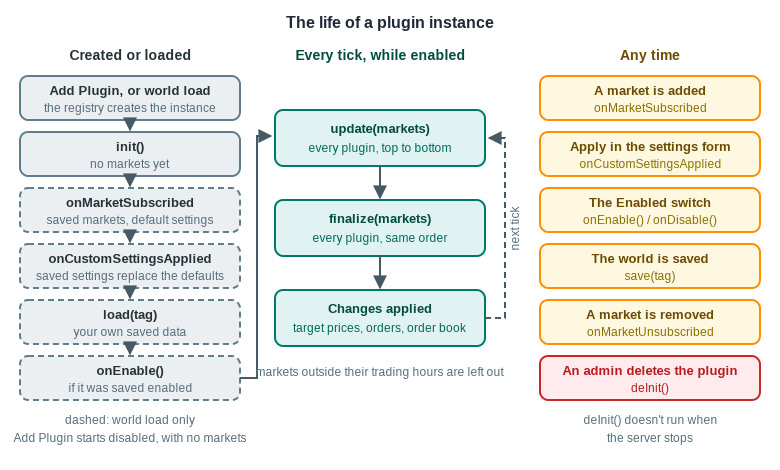
| Call | When |
|---|---|
| Constructor | The registry creates an instance: when an admin clicks Add Plugin, and for every saved instance when the world loads. |
init() |
Right after the instance is created. The plugin has no markets yet. |
onMarketSubscribed(marketID) |
A market is added to the plugin: by an admin, by auto-subscribe when a new market is created, or while loading. Then the framework stores provideDefaultCustomSettings() for that market. |
onCustomSettingsApplied(marketID, settings) |
Settings were stored for a market: the defaults on subscribe, an admin's Apply, the saved values on load, or your own replaceCustomSettings call. |
onEnable() / onDisable() |
The Enabled switch changes. |
update(markets) / finalize(markets) |
Every tick while the plugin is enabled. |
save(tag) / load(tag) |
When the world is saved and loaded. |
onMarketUnsubscribed(marketID) |
A market is removed from the plugin. Its settings are dropped. |
deInit() |
Only when an admin deletes the plugin instance. |
A new instance starts disabled, with no markets. Its name and description come from the registry. The admin switches it on and adds markets.
When the world loads, each saved instance goes through these steps:
- The constructor and
init()run. - Name, description, Logger and Auto-subscribe are restored.
- The saved markets are subscribed:
onMarketSubscribedand the default settings for each. - The saved settings replace the defaults:
onCustomSettingsAppliedfor each market. load(tag)gets your own saved data.- The plugin is enabled last, if it was saved enabled.
onEnable()runs.
deInit() doesn't run when the server stops
It only runs when an admin deletes the plugin. Don't rely on it to save anything. Use save(tag) for data that must survive a restart.
Saving
The framework saves for each instance: the instance ID, name, description, the switches, the subscribed markets and the settings of every market (written with your settings codec). Your save(tag) and load(tag) are only for extra data, such as values the plugin worked out over time.
When the world loads and a saved instance has a plugin type that isn't registered, the manager skips it. The log only says so when Plugin manager logger is switched on in the Plugin Management screen. At the next save, that instance and its data are gone. This happens when the plugin mod is missing, and also when you change the type ID. The usual type ID is the class name, so moving or renaming the plugin class loses all saved instances.
Registering
Register the plugin type once, in common code that runs on the server and on the client:
public static final PluginRegistryObject MY_PLUGIN = PluginRegistry.registerPlugin(
        MyPlugin.class.getName(),   // type ID: unique, never change it
        "MyPlugin",                 // name in the plugin list
        "What the plugin does.",    // description in the Add Plugin list
        MyPlugin::new               // creates a new instance
);
Set the settings form only on the client, so dedicated servers never load client classes:
Where the plugin must be installed:
- Server. Plugins run only on the master server. On a single server, that's the server itself.
- Client. The Add Plugin list comes from the client's registry, and the client builds the settings form. An admin without your mod sees Plugin mod not installed — custom UI unavailable in the plugin's entry.
What a plugin can do
| To ... | Use |
|---|---|
| Set or shift the target price | setTargetPrice, addToTargetPrice, isTargetPriceSetThisTick on IPluginMarket |
| Share a fair price with other plugins | setEquilibriumPrice, getEquilibriumPrice |
| Change the default price for good | setDefaultRealPrice |
| Place market or limit orders | placeOrder(amount), placeOrder(amount, price) |
| Read the player supply and demand | getFadedNetPlayerItemFlow, getNetPlayerItemFlow |
| Read the order book | getRealVolume, getRealVirtualVolume, getCapital, getBuyOrders, getSellOrders on IPluginOrderBook |
| Size an order that must not pass a price | getRealVirtualVolumeToPrice, getRealVirtualAvailableVolume |
| Change the bot orders in the book | setRawVolume, addRawVolume, resetVirtualVolume, registerDefaultVolumeDistributionCalculator |
| Keep settings per market | customSettingsCodec, provideDefaultCustomSettings, getCustomSettings on ServerPlugin |
| Stream live values to the settings form | runtimeDataCodec, provideRuntimeData |
| Show a settings form or a screen | a PluginGuiElement subclass |
| Draw on the chart of the Plugin Management screen | chart overlays |
Related pages
- Your first plugin: build the example plugin step by step.
- Plugin API reference: every method in detail.
- Plugins: how admins add, order and set up plugins.
- Market access API: read and change markets from outside a plugin.