Discord feed
Both mods can post to Discord channels: deposits, transfers, trades, admin changes and alerts. They use Discord webhooks, so no bot is needed. The feed is off by default.
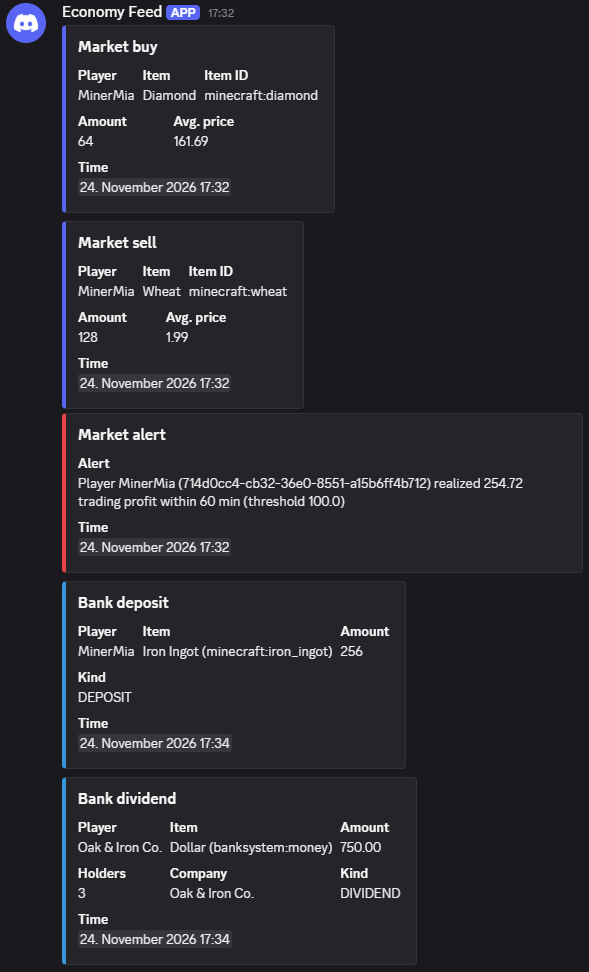
Only the master server posts, so every event shows up once. Slaves send nothing.
Setting it up
- Create a webhook in Discord: channel settings → Integrations → Webhooks → New Webhook → Copy Webhook URL. One webhook per channel.
- Start the server once. It creates the folder
config/modutilities/discord/withwebhooks.json,banksystem.jsonandstockmarket.json. -
Add your webhooks to
webhooks.json, each under a name you choose:{ "webhooks": { "bank": "https://discord.com/api/webhooks/<id>/<token>", "admins": "https://discord.com/api/webhooks/<id>/<token>" } }Only Discord webhook URLs are accepted. Other entries are skipped with a warning in the log.
-
Choose the messages in
banksystem.jsonandstockmarket.json. Every message type starts off. Turn on the ones you want and list the webhook names they go to:{ "language": "en_us", "types": { "bank-deposit": { "enabled": true, "webhooks": ["bank"], "minAmount": 1000 }, "bank-suspicion": { "enabled": true, "webhooks": ["admins"], "minAmount": 0 } } }minAmountskips smaller events: dollars for money, the number of items otherwise.languagesets the message language:en_us,de_de,de_chorzh_cn. -
Turn on the feed in each mod's Mod Settings: Discord feed for BankSystem, Discord feed (trades and alerts) for StockMarket. No restart needed.
- Load the files with
/banksystem discord reload, or restart the server.
Keep webhook URLs secret
Anyone who has a webhook URL can post to your channel. Don't share webhooks.json or paste the URLs anywhere. The mods never show them in game or in the log.
Commands
| Command | What it does |
|---|---|
/banksystem discord status |
Lists the webhooks (valid or not) and, for both mods, which message types are on, their minAmount and their webhooks. |
/banksystem discord reload |
Reads all files in config/modutilities/discord/ again. |
/stockmarket discord and /modutilities discord do the same. All three need operator level 3 or the permission modutilities.command.discord, see Admins and permissions. On a slave, status first says that the master posts. The lines below it show the slave's own webhooks, queue and message types, not the master's.
BankSystem messages
| Type | Posted when |
|---|---|
bank-deposit |
Items or money go into an account: Bank Terminal, Upload Block, banknotes and currency bindings. |
bank-withdraw |
Items or money come out, also when a closed account is paid out. |
bank-transfer-in, bank-transfer-out |
An account receives or sends a transfer. |
bank-payout |
A company pays its members. Posted for the receiving account. |
bank-dividend |
A company pays a dividend. A dividend run is one message with the total and the number of holders. |
bank-share |
Shares are stamped, redeemed or traded. |
bank-admin |
An admin changes a balance, unlocks, freezes, edits or closes an account, or removes a bankable item. Removing an item is one message for all accounts. |
bank-suspicion |
A suspicion flag is raised. |
bank-other |
Everything else, for example the starting balance. |
Stock trades are not posted here. StockMarket posts them itself.
StockMarket messages
| Type | Posted when |
|---|---|
market-buy |
A player's buy order is finished: filled, or cancelled after part of it was filled. Shows the item, amount and average price. |
market-sell |
The same for sell orders. |
market-exchange |
A player's item for item order is finished. One message per order, with what was sold, what was bought and the money left over. |
market-alert |
A trading alert is raised. |
Bot orders and orders with no fill are never posted. For trades, minAmount is the number of items traded. For market-exchange it is the amount the player entered in the order.
Privacy
Trade and bank messages name the player only. They leave out the account number, the player's UUID and the other account of a transfer.
Two message types are different. bank-suspicion shows the flagged account, and market-alert names the player and their UUID. Send them to a channel that only admins can read.
Showing more fields
You can change what a message shows. Give the type its own fields list. It replaces the default fields completely, so list every field you want:
"bank-transfer-out": {
  "enabled": true, "webhooks": ["bank"], "minAmount": 0,
  "fields": [
    {"name": "Player",       "value": "{player}",        "inline": true},
    {"name": "Account",      "value": "{account}",       "inline": true},
    {"name": "Counterparty", "value": "{other_account}", "inline": true},
    {"name": "Amount",       "value": "{amountText}",    "inline": true},
    {"name": "Time",         "value": "{time}",          "inline": false}
  ]
}
Then run /banksystem discord reload. A field with an empty value is left out. A type can also have its own title and color. Your own fields are kept when a mod update changes the defaults.
| Messages | Values you can use |
|---|---|
bank-* |
{player}, {player_uuid}, {account}, {other_account}, {item}, {amountText} (formatted), {amount} (plain number), {holders}, {company}, {kind}, {note}, {time} |
bank-suspicion |
{account}, {flag}, {severity}, {amountText}, {amount}, {details}, {ref}, {time} |
market-buy, market-sell |
{player}, {player_uuid}, {account}, {item}, {item_id}, {amount}, {price} (average), {time} |
market-exchange |
{player}, {player_uuid}, {account}, {sold_item}, {sold_item_id}, {sold_amount}, {sold_price}, {bought_item}, {bought_item_id}, {bought_amount}, {bought_price}, {leftover}, {currency}, {amount}, {interMarketGroup}, {time} |
Related pages
- Alerts and suspicion flags: what the alerts mean.
- Placeholders: show live values in game.
- Admins and permissions: who may run the Discord commands.